Free Music Visualizer: Turn Any Song Into a Video With Synced Lyrics
Give your track an audio-reactive video: a glowing circle that moves with the music, colour rings, particles, your own background and logo, and the lyrics lighting up as they're sung. Free, in your browser, sized for TikTok, Reels, Shorts and YouTube.
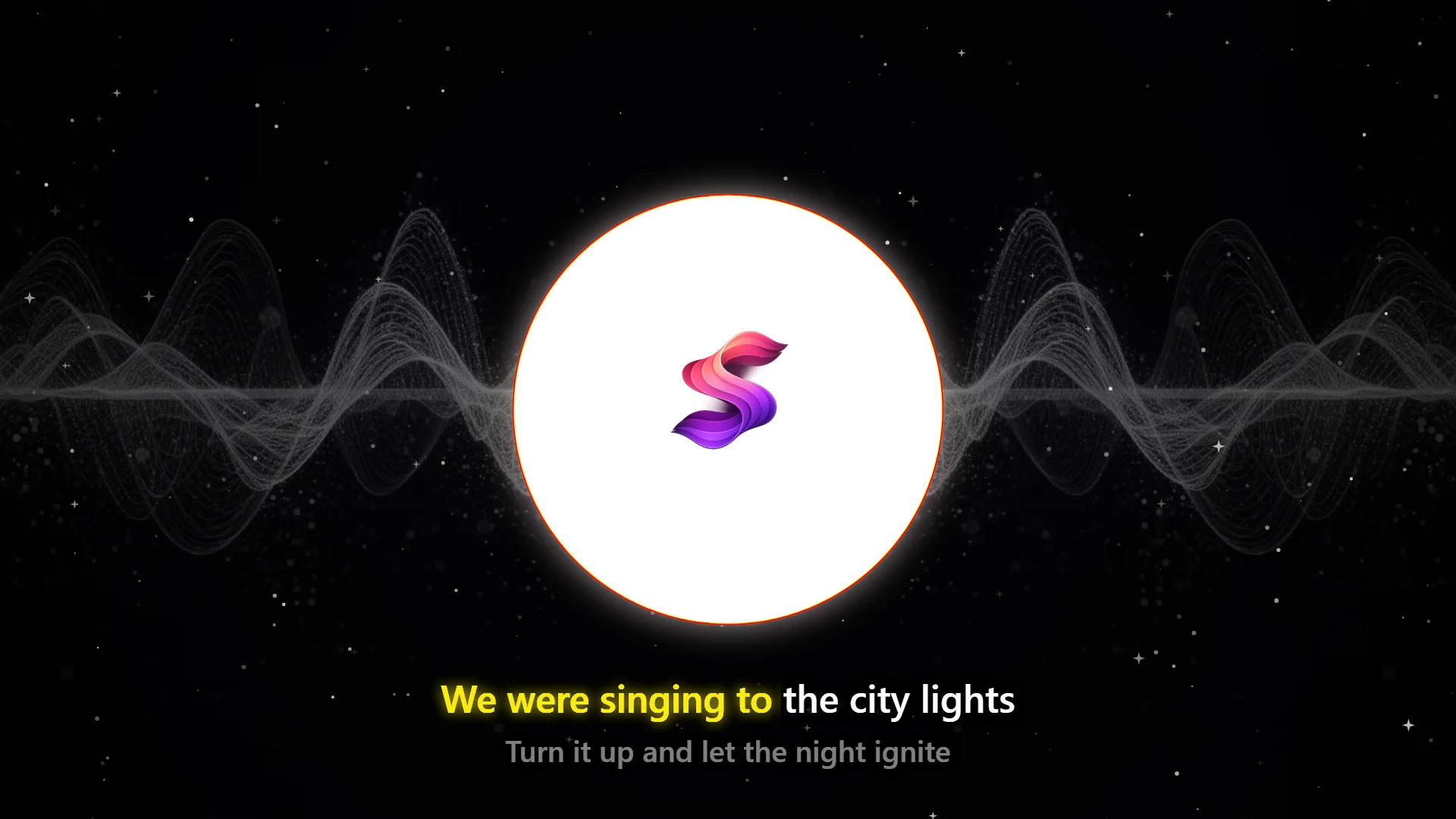
What the Music Visualizer Makes
At the centre is a circle that pulses with the bass and bends with the rest of the mix. Up to six colour rings trail its outline, a bloom makes it glow, and particles drift around it: dots, sparkles, stars, snow, hearts, notes, bubbles or an icon of your own. Behind it sits your background image, which you can turn greyscale, mirror and darken so the lyrics stay readable, and your logo sits inside the circle.
The lyrics run in time with the song in one of three styles: karaoke, where each word lights up as it's sung; lines, where the whole line appears at once; or words, where they pop in one at a time. You choose the font, size, colours, outline and position, and whether the next line shows underneath.
The result exports as an MP4 at 1080p in square, widescreen or vertical format, at 60 or 30 frames per second.
How to Make a Music Visualizer Video
Open the visualizer
Go to the music visualizer. It runs in your browser, so there is nothing to install.
Add your song
Use the Music file button in the panel, or drag an MP3, WAV or other audio file onto the preview. If you make music on SoundLab AI, log in and choose one of your own songs from Your songs instead.
Add the lyrics
SoundLab songs bring their synced lyrics with them. For your own music, choose Lyrics file and add an LRC file or SRT/VTT subtitles. Skip this step for an instrumental.
Style it
Add a background image and a logo for the centre, pick the ring colours, particles and the lyric font, size and colours. Every option has a short explanation next to it.
Pick a format
Square, widescreen or vertical. The preview switches straight away, so you can check how the lyrics sit before you export.
Export
Log in with a free account and press Export. The video renders frame by frame, faster than the song plays on most computers, and Chrome and Edge let you choose where to save it. Or press Record live to capture the preview as it plays.
Synced Lyrics Without the Busywork
Songs made on SoundLab AI are timed word by word a few minutes after they're created, so picking one in the visualizer brings the lyrics in already synced. There is nothing to type or line up.
For your own music, the visualizer reads the formats people already use. An LRC file is the simplest: each line starts with the time it's sung, in minutes, seconds and hundredths.
[00:12.50] First line of your lyrics
[00:16.80] The next line
[00:21.00]
[00:28.40] A time with no words clears the screen
Start from our sample lyrics file and change the words and times to match your song. Subtitle files work too: SRT and VTT, including captions from YouTube and transcripts from Whisper. Lyrics typed as long paragraphs are broken into short phrases so they never fill the screen, and Chinese and Japanese lines are timed character by character.
The Right Shape for Every Platform
| Format | Size | Best for |
|---|---|---|
| 9:16 vertical | 1080 × 1920 | TikTok, Instagram Reels, YouTube Shorts, Stories |
| 16:9 widescreen | 1920 × 1080 | YouTube videos, websites, presentations |
| 1:1 square | 1080 × 1080 | Instagram and Facebook feed posts, X |
Make the vertical version for short-form video and the widescreen one for a full YouTube upload. Switching formats keeps every other setting, so the two look like a set.
Keep Your Look With Templates
Once you have a style you like, save it as a template with a free account. Load it for your next release and every video in a series matches: the same colours, rings, particles and lyric style. Templates keep your settings; add your background and logo again each time.
Your Music Stays on Your Device
The visualizer renders the video in your browser. When you use your own music file, it isn't uploaded anywhere, and you can preview as many versions as you like before you export.
What You Need
Any modern browser runs the preview, on a computer or a phone. Exporting the MP4 uses the browser's built-in video encoder, so it needs Chrome or Edge on a computer. Keep the tab open while it renders.
No Song Yet? Make One First
SoundLab AI writes and sings a full song from a short description: type the mood, the genre or your own lyrics, and two versions come back in seconds. New accounts get 10 free credits, enough for a first song, and songs with vocals get synced lyrics for the visualizer automatically. Our prompting tips show how to get the sound you have in your head, and content creators can see how others use their songs.
Frequently Asked Questions
Is the music visualizer free?
Yes. You can open it and preview a video with your own music file without an account. Exporting the MP4 needs a free SoundLab AI account, and it costs no credits.
Can I add lyrics to my music visualizer?
Yes. Lyrics appear in sync with the song in karaoke, line or word-by-word style. Songs you made on SoundLab AI bring their word-timed lyrics with them automatically. For any other song, add a lyrics file: an LRC file, or SRT or VTT subtitles.
What sizes and formats does it export?
MP4 video (H.264 with AAC audio) at 1080×1080 for square, 1920×1080 for widescreen or 1080×1920 for vertical, at 60 or 30 frames per second and three quality levels. You can also record the preview live as a .webm file.
Does it work on a phone?
The preview works in any modern browser, phones included. Exporting the MP4 uses the browser’s built-in video encoder, so it needs Chrome or Edge on a computer.
Is my music uploaded anywhere?
No. When you use your own music file, the visualizer renders the video in your browser and the file stays on your device.
Can I post the videos on TikTok, Instagram or YouTube?
The video file is yours to post. What matters is the music in it: songs made on a SoundLab AI Pro plan come with full commercial rights, and for anyone else’s music you need the rights to use it.
Make Your First Visualizer Video
Bring a song and its lyrics, or pick one you made on SoundLab. Preview free, then export the MP4 with a free account.
Open the Free Visualizer